
 Almost everyone of us use Windows Live mail, in the recent version of the Windows Live mail, many of the users tend to delete the contacts accidentally, so let’s see today how you can recover the deleted contacts easily as it’s very difficult to again create a set of contacts as once if you lose them then you need to compile them again which may not be practical, though its advisable to create a back up of all your contacts once in a while so that if you even lose your contacts, you will not end up loosing every contact which you have created and must have taken years to build that contact list. So, let’s check out how you can recover the contact list in your Windows Live mail.
Procedure to recover the lost contacts in Windows Live mail:
- First, you will need to sign out of your account and need to go to www.live.com and then you need to log into the account.
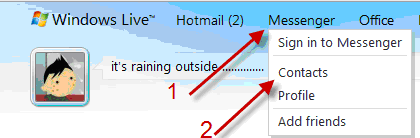
- Now, you need to click on the messenger and then you need to click on the contacts but you need not log into the messenger though.
- Go to Manage and select Restore deleted contacts.
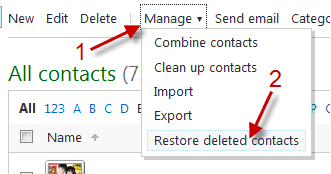
- Now, you need to choose the contacts which you want to restore and then you need to click on the Restore option. Now, you can also restore all the contacts by clicking on Restore all option. Also, most importantly note that you can’t restore the contacts deleted which are more than 30 days ago.

- Now, after contacts have been restored, click on Add as friend as shown below.
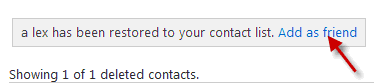
- Now, choose an Invite option in the pop up window and after that, contacts will be restored automatically. Also, your friends will not receive any invitation because your ID is still in their list.

Lastly, sign in back to the Windows Live messenger and aster sometime you will be able to find all the contacts which have been disappeared. Do let us know if you come across any problems in restoring the contacts. Also, most importantly its recommended to have the backup of all the contacts periodically.