
 Confused? Yes many times we are confused on how can we check the status of consignment or track the movement of shipped consignment. So, let’s check out an easiest way wherein you can track the same without you needing to go here and there for checking the status. This time, not Google but Microsoft’s Bing will help you in tracking the packages. Now, you may think on how Microsoft’s Bing can track the consignments of various shipping service providers like UPS, FEDEX, USPS or the DHL Packages. The thing is, basically the Microsoft Bing search engine makes it easier as with this it hardly takes 2 clicks to address your query. If such tools are not there then it becomes difficult, as first you need to search individual Service provider’s website and then search for its TRACKING section for entering the consignment number and then track the same.
Procedure to track consignments using Bing:
- First, you need to open any internet client and need to enter address in the address bar as www.Bing.com.
- So, now as soon as the Bing page loads, you will find a search box on the screen where in you just need to enter in the Shipper name like UPS, FedEx, USPS, or DHL in the text box.
- Now simply click on the orange button with the magnifying glass in it or simply press Enter from your keyboard.
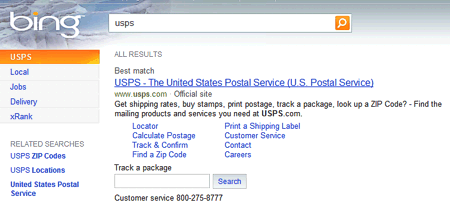
- Now, as soon as you hit on Enter, you will find the list of results where in you just need to enter in the consignment number in the search box below the provider’s result time line as shown below.
So, as soon as you click on the Search, you will get the consignment details on your screen as shown in the above screen shot. Please note that currently this service is only available for tracking select carriers and soon it will be available for other carriers too.