
HTTPS or HyperText Transfer Protocol with Secure Sockets Layer which sends the data over internet in a much more secured way so that it’s not stolen. So when you are on to a online store and if you find https connection on to your webpage URL that means that its secured form of transmissions of data in between.
We all see lot of people complaining about their credit card number stolen and misused, with HTTPS connection the chances of getting your card stolen are very very less until it’s an end user mistake.
So important is your GMail account and Google also understands that. For this purpose they have release a new setting in GMail which will force your browser to start a secure connection by opening GMail through HTTPS.
Here is the procedure on how to enable that for your Google Account in GMail Settings –
- The first I want to tell you that the settings that you apply here are reflected to only one Google Account and if you have multiple account you should do the same for all accounts. Once logged in into your account click on settings (its now Mail Setting with new GMail revamping).
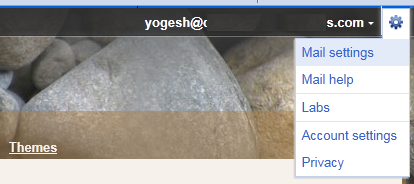
- Now in Settings you will find the option of General tab, proceed to that.
- Then under General tab you will find Browser connection in which you have to select “Always use https” options.

- Click on Save Changes to take the setting into effect.

And now whenever you open your Google Account it would automatically make that session in through HTTPS connection.
 You should thank Google for that!